
McDonald’s App Review
I’ve spent the past few months using the McDonald’s app regularly — ordering ahead before road trips, testing the rewards system against my receipts, and comparing McDelivery prices to in-store totals. Here’s an honest, practical breakdown of what the app does well, where it falls short, and how to actually get value out of it.
What the McDonald’s App Is
The McDonald’s App is the company’s official ordering and loyalty platform, available on iOS and Android. It combines four functions: mobile ordering, a points-based rewards program (MyMcDonald’s Rewards), delivery through McDelivery, and a location finder. It’s free to download, and you don’t need a rewards membership to use the basic ordering features — though skipping sign-up means leaving points on the table.
What sets it apart from just walking up to the counter isn’t really speed (drive-thru lines can still be drive-thru lines) — it’s the combination of app-exclusive pricing and the ability to save customizations so you’re not repeating “no pickles, extra sauce” every visit.
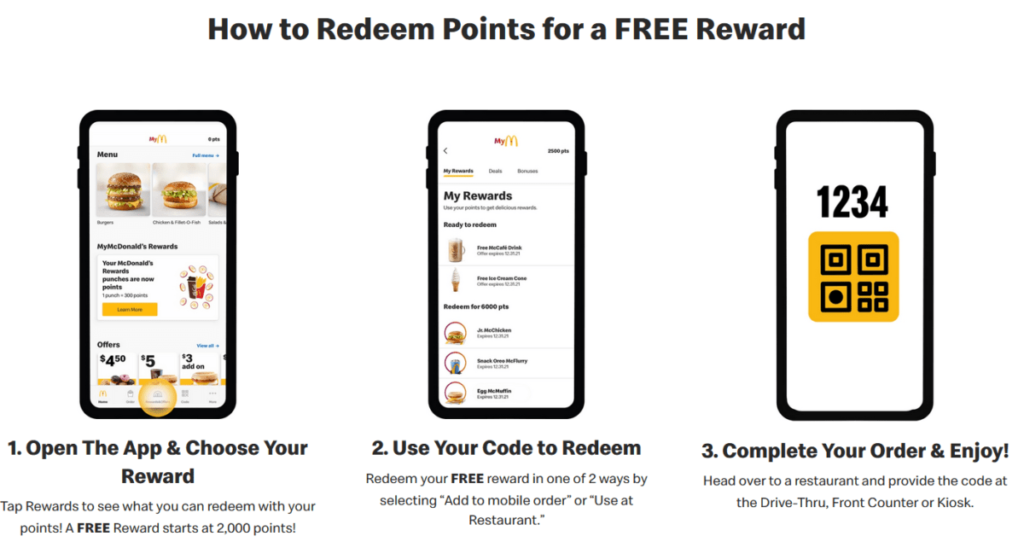
Setting It Up: What to Expect
Installation is straightforward, but a few steps matter more than they look:
Download and account creation. Search “McDonald’s” in your app store, install, and sign up with an email and password. You’ll need to verify your email before rewards points start accruing — I’ve seen orders placed during that verification gap not register correctly.
Location and notification permissions. Location access matters for accuracy in Drive-Thru/Curbside selection, not just for finding nearby stores — without it, the app sometimes defaults to the wrong location if you’ve moved since your last order. Notifications are genuinely worth turning on; the better deals (free sandwich with purchase, $1 menu items) tend to be notification-exclusive and rotate weekly.
Saved orders. This is the feature most people skip and shouldn’t. Once you build a saved order with your exact modifications, reordering takes about three taps.
MyMcDonald’s Rewards: The Real Math
The points system is simple but worth understanding precisely, since the redemption value isn’t flat across tiers.
| Spend | Points Earned |
|---|---|
| $1 | 100 points |
Redemption tiers:
- 1,500 points — small fries, hash browns, or a vanilla cone
- 3,000 points — cheeseburger or 6-piece McNuggets
- 4,500 points — Big Mac or Quarter Pounder
- 6,000 points — Happy Meal or large fries
A practical note from actually tracking this: redeeming at the 4,500-point tier for a Big Mac generally gives better value per point than cashing out small rewards repeatedly, since the cost-per-point tends to improve at higher tiers. If you eat at McDonald’s semi-regularly, it’s worth letting points accumulate rather than redeeming as soon as you hit 1,500.
One limitation worth knowing: points are only earned on in-app purchases, including McDelivery orders placed directly through the app. Orders through Uber Eats or DoorDash don’t count, even if you’re ordering from the same restaurant.
Mobile Order & Pay
You select your restaurant, choose Drive-Thru, Curbside, or Front Counter, and pay via Apple Pay, Google Pay, or a saved card. In practice, Drive-Thru mobile orders work well at higher-volume locations but can occasionally cause confusion at smaller stores where staff are still cross-checking mobile orders against the in-store system manually if your order doesn’t show up immediately, giving the order number to staff resolves it faster than waiting.
McDelivery: Where It’s Worth It (and Where It Isn’t)
McDelivery lets you order without leaving home, with real-time tracking and the ability to apply saved deals. The trade-off is real: delivery prices typically run higher than in-store or pickup pricing, on top of delivery and service fees. For a single combo meal, that markup can make delivery considerably more expensive than driving over yourself. It tends to make more sense for larger group orders where the per-person fee impact is smaller, or when the alternative is genuinely not going at all.
App-Exclusive Deals
Deals rotate regularly and have included offers like buy-one-get-one-free items, $1 large fries, and free sandwiches with purchase. A few practical caveats: not all deals stack, and many are limited to one redemption per order, so it’s worth reading the fine print on a deal before building your full order around combining several.
Restaurant Locator
Useful for checking hours and getting directions, particularly helpful when traveling, since hours can vary meaningfully by location (some are 24-hour, many aren’t).
Practical Tips That Actually Move the Needle
- Turn on notifications — the best deals are often time-limited and pushed there first, not buried in a deals tab
- Hold points for higher-value redemptions rather than cashing out small rewards
- Double-check whether a deal is stackable before assuming it is
- Use Wi-Fi for the initial download/update, since the app is sizable
- If a mobile order doesn’t appear at the restaurant, have your order number ready rather than waiting
Frequently Asked Questions
Is the McDonald’s App free
Yes, free to download and use, with no subscription cost.
Do I get rewards points automatically
Yes creating an account enrolls you in MyMcDonald’s Rewards automatically, though points only count once your email is verified.
Do third-party delivery orders (Uber Eats, DoorDash) earn points
No. Only orders placed through McDelivery within the app itself earn rewards points.
Can I combine multiple deals on one order
Not always — many deals are restricted to one use per order, so check the terms before assuming they’ll stack.
Does mobile ordering work for drive-thru
Yes, select Drive-Thru during checkout in Mobile Order & Pay.
Can I use the app outside the U.S.
Yes, though available features and the rewards structure can vary by region.
What if my order arrives wrong
Use in-app support or contact the restaurant directly; for delivery issues, the app’s order tracking screen usually has a direct support link.
Is my data secure in the app
McDonald’s states it follows standard data protection practices, though as with any app handling payment information, it’s worth reviewing the privacy policy directly for specifics on data retention and third-party sharing.